



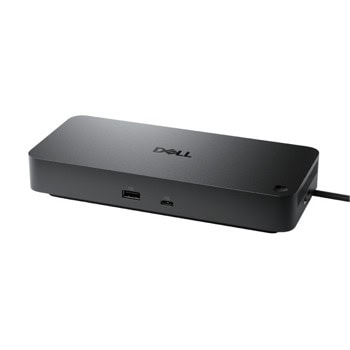
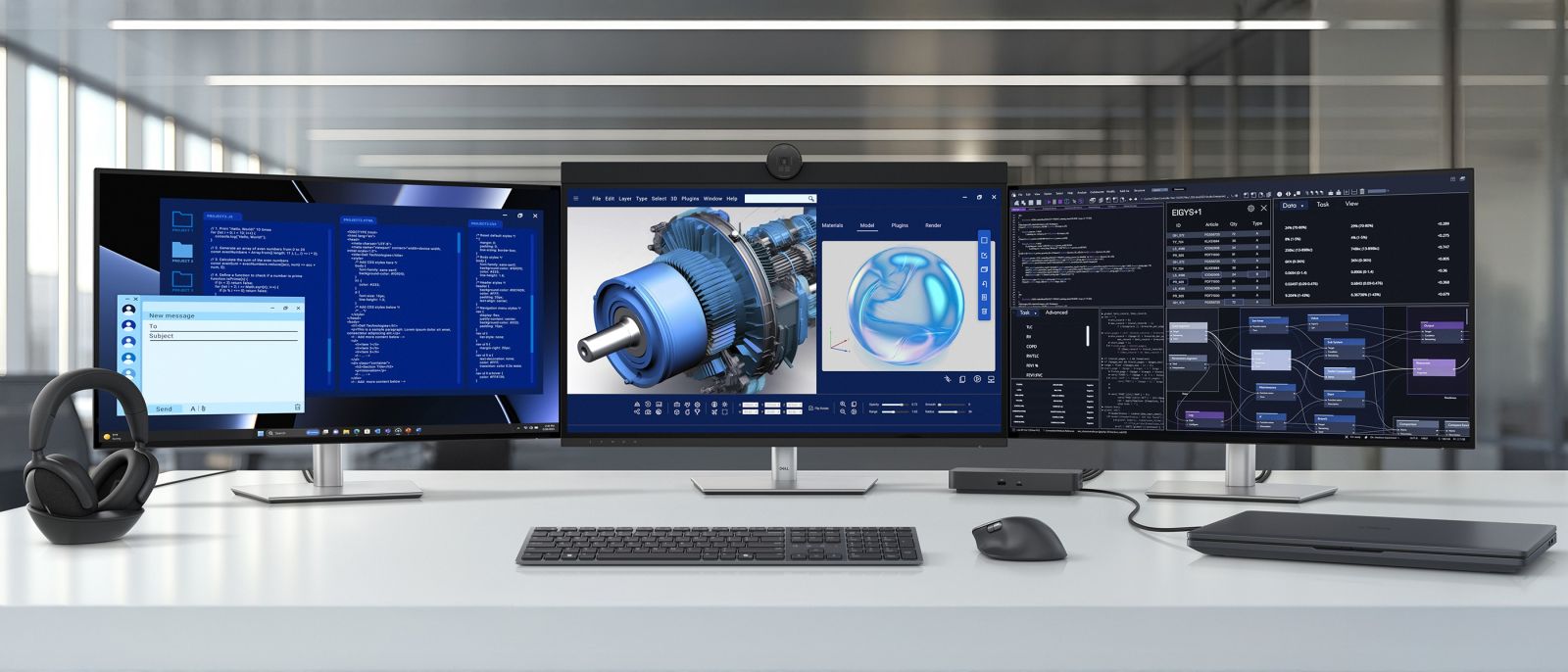
Power AI productivity
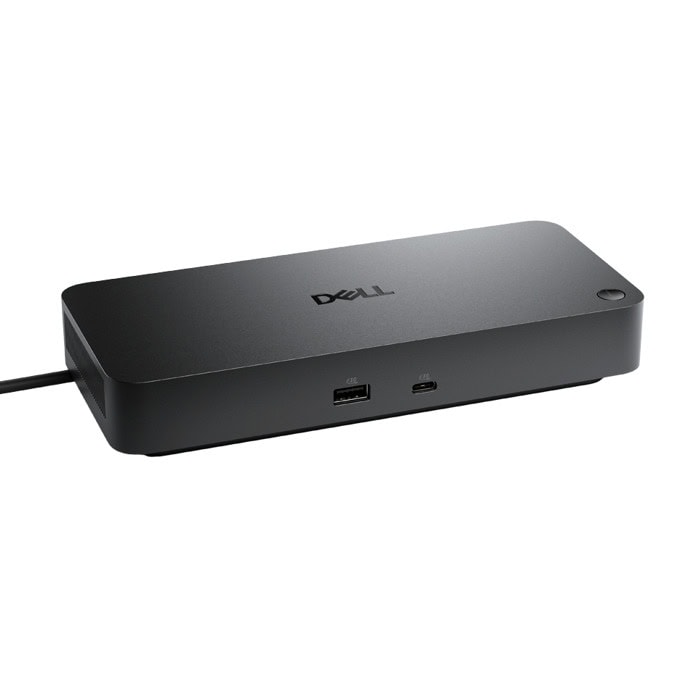
Maximize AI PC productivity with the industry’s most powerful Thunderbolt 5 dock and seamlessly run Gen AI tools across up to four 4K 120Hz displays. Featuring Extended Power Range, deliver up to 300W over a single USB-C cable to power even the highest-performance AI PCs, while modern ports ensure broad connectivity.
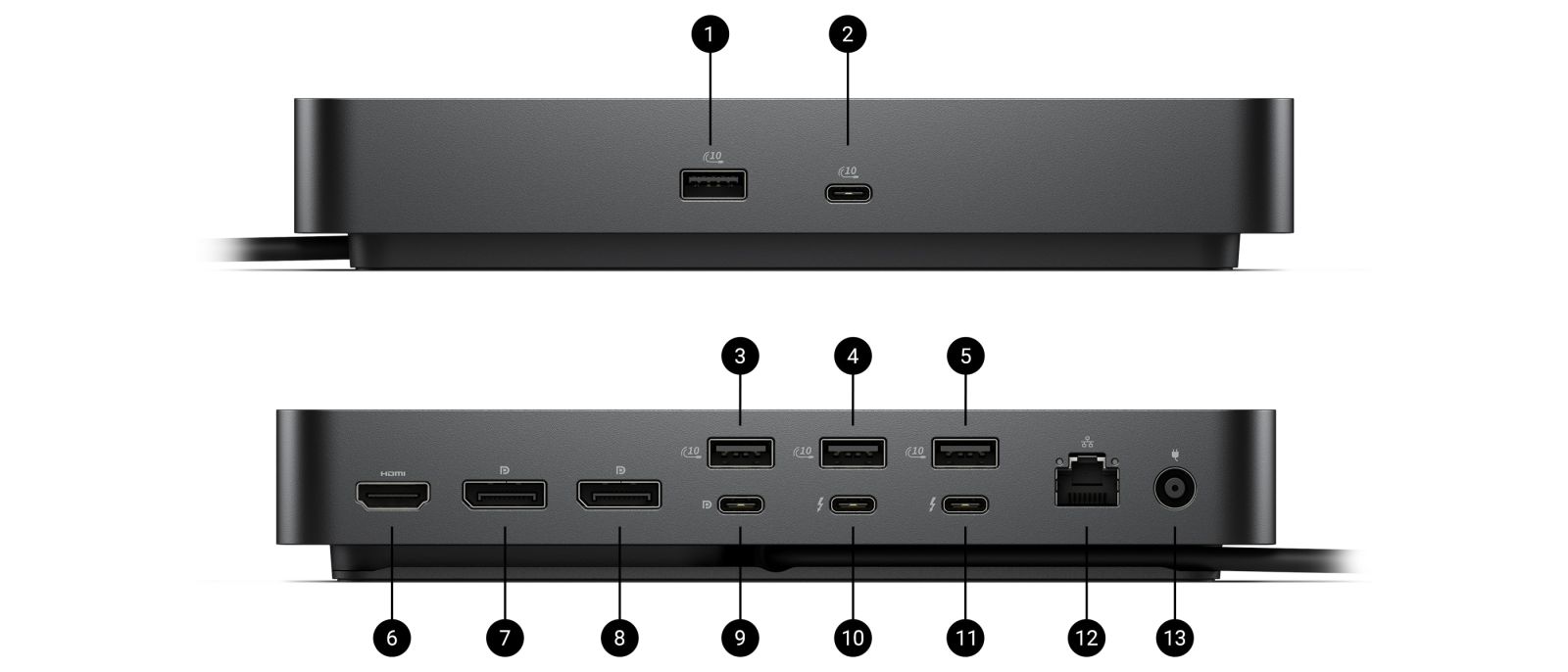
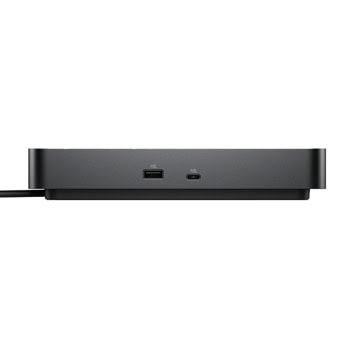
Front side
1. USB-A 3.2 Gen 2 with PowerShare
2. USB-C 3.2 Gen 2
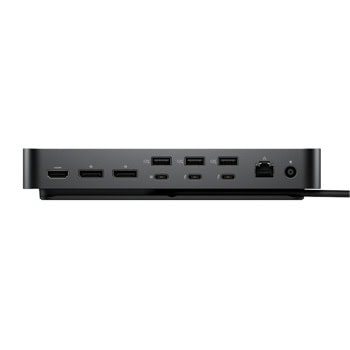
Rear side
3. USB-A 3.2 Gen 2 with PowerShare
4. USB-A 3.2 Gen 2 with PowerShare
5. USB-A 3.2 Gen 2 with PowerShare
6. HDMI 2.1
7. DisplayPort 2.1
8. DisplayPort 2.1
9. USB-C 3.2 Gen 2 Multifunction DisplayPort 2.1
10. Thunderbolt 5
11. Thunderbolt 5
12. 2.5 Gigabit Ethernet (RJ45)
13. Power In
Tech Specs
General Information
Manufacturer
Dell Technologies
Manufacturer Part Number
CMX23
Brand Name
Dell
Product Model
WD25TB5
Product Name
Pro Thunderbolt 5 Dock - WD25TB5
Product Type
Docking Station
Product Series
Pro
Technical Information
Connectivity Technology
Wired
Device Supported
- Desktop PC
- Notebook
Cable Length
2.72 ft
Features
- Indicator Light
- LED Power Indicator
- Power Delivery Pass-through
Management Features
- Dell Command Update (DCU)
- Dock Power Button Sync
- Firmware update on disconnect
- Host PC based firmware update
- Intel AMT over Thunderbolt with select Intel vPro PCs
- Kernel Direct Memory Access (DMA) Protection
- MAC Address Pass-through
- Port Disablement
- PXE Boot
- Wake-on-LAN
- WLAN to LAN Switch
Number of Displays Supported
4
Screen Mode Supported
- 4K @ 120Hz
- 4K @ 60Hz
- 5K @ 60Hz
- 6K @ 60Hz
- 8K @ 60Hz
- QHD @ 60Hz
- WQHD @ 60Hz
Supported Resolutions
- 2560 x 1440
- 3440 x 1440
- 3840 x 2160
- 5120 x 2160
- 6144 x 3456
- 7680 x 4320
Maximum Data Transfer Rate
1.25 GB/s
Security Slot Type
- Kensington Security Slot
- Noble Wedge Security Slot
Power Delivery Details
- 4 x USB-A 3.2 Gen 2 (4.5W each)
- 1 x USB-C 3.2 Gen 2 (15W)
- 1 x USB-C Multi-function DisplayPort (7.5W)
- 2 x Thunderbolt 5 (15W each)
- All deliver power with or without PC
- (Requires USB-C PD 3.1 Extended Power Range
Power Delivery
- 240W (non-Dell Systems)
- 300W (Dell Systems)
Video Resolution Details
- 4K - 120 Hz (Quad Display)
- 4K - 120 Hz (Triple Display)
- 4K - 60 Hz (Dual Display)
- 4K - 60 Hz (Quad Display)
- 4K - 60 Hz (Triple Display)
- 5K - 60 Hz (Single Display)
- 6K - 60 Hz (Dual Display)
- 8K - 60 Hz (Single Display)
- QHD - 60 Hz (Quad Display)
- WQHD - 60 Hz (Triple Display)
Network & Communication
Ethernet Technology
2.5 Gigabit Ethernet
Interfaces/Ports
Host Interface
Thunderbolt 5
Total Number of USB Ports
6
USB Type-A
Yes
Number of USB 3.2 Gen 2 Type-A Ports
4
Number of USB 3.2 Gen 2 Type-C Ports
1
Number of USB Type-A Ports
4
USB Type-C
Yes
USB Type-C Detail
1 x USB-C 3.2 Gen 2 (10 Gbps), (15W), 1 x USB-C Multi-function DisplayPort (7.5W)
Number of USB Type-C Ports
2
Network (RJ-45)
Yes
DisplayPort
Yes
Number of DisplayPorts
2
DisplayPort Version
2.1
HDMI
Yes
Number of HDMI Ports
1
HDMI Version
2.1
Thunderbolt
Yes
Thunderbolt Ports Quantity
2
Interfaces
- 2 x DP2.1
- 1 x HDMI 2.1
- 1 x USB-C 3.2 Gen 2 Multi-function DisplayPort 2.1
- 2 x Thunderbolt 5
Thunderbolt 5
Yes
Software
Host Software
Host Software (Windows):
- Dell Firmware Utility
- Dell Display and Peripheral Manager
- Dell Command Update
Cloud Management (via host PC software)
Dell Device Management Console enables:
- Automatic firmware updates
- Maintain specific firmware version or downgrade
- Peripheral inventory and status
Operating System Supported
- ChromeOS 141
- macOS
- Red Hat Enterprise Linux 9.7
- Ubuntu 24.04
- Windows 10
- Windows 11
Power Description
Maximum Power Supply Wattage
330 W
Power Source Type
Power Adapter
Physical Characteristics
Height
1.39"
Width
8.07"
Depth
3.54"
Weight (Approximate)
1.37 lb
Виж още Докинг станции Dell
Виж всички Докинг станции в категорията
| USB Type-А: | Да |
|---|---|
| USB Type-C: | Да |
| Lightning: | Не |
| USB 2.0: | Не |
| USB 3.X: | Да |
| USB 4.X: | Не |
| Thunderbolt: | Да |
| DisplayPort: | Да |
| Mini DisplayPort: | Не |
| HDMI: | Да |
| DVI: | Не |
| VGA (D-Sub): | Не |
| RJ45: | Да |
| Аудио изход: | Не |
| Четец на карти: | Не |
| Тип: | Laptop |
|---|---|
| Съвместимост: | Универсална |
| От какъв интерфейс: | USB C |
- 5
0 ревюта
- 4
0 ревюта
- 3
0 ревюта
- 2
0 ревюта
- 1
0 ревюта





-
 Какво пазаруват другите
-
 Най-продавани продукти
-
 Промоционални продукти
-

30.67 €
-

19.99 €
25.99 € -

20.59 €
22.24 € -

111.97 €
-

20.85 €
-

12.99 €
-

194.99 €
-

19.49 €
30.16 € -

35.95 €
-

11.55 €
-

34.44 €
-

21.99 €
24.99 € -

47.07 €
-

35.33 €
-

107.63 €
-
20.85 €
-
19.49 €
30.16 € -
47.07 €
-

58.85 €
-

63.00 €
-

30.30 €
-

28.11 €
-
63.00 €
-

24.99 €
-

25.38 €
-

16.99 €
-

144.42 €
-

40.01 €
-

42.98 €
-
20.85 €
-

43.50 €
-

41.99 €
-

116.50 €
-

53.84 €
-

64.46 €
-
25.75 €
-

279.99 €
-

173.46 €
-

66.99 €
-

29.99 €












Докинг станция Dell SD25TB5, от Thunderbolt 5 към 2x Thunderbolt 5, 2x USB-C, 4x USB-A, 2x DisplayPort, 1x HDMI, 1x RJ45, черна370.68 €

Докинг станция Dell Thunderbolt Dock WD22TB4 180W, от USB C към 2x Thunderbolt, 2x USB C, 3x USB A, 2x DisplayPort, 1x HDMI, 1x RJ-45, за лаптопи Dell, черна359.99 €

Докинг станция Anker Prime TB5 Thunderbolt 5 Docking Station 14-in-1, от USB C към 2x Thunderbolt 5, 2x USB C, 3x USB A, 1x DisplayPort, 1x HDMI, 1x AUX, 1x RJ45, 1x SD четец, 1x MicroSD четец, сива346.08 €